# How I manage my blog
In this post I am going to describe my blog's architecture: what services it's composed of, where is it deployed, how I deploy it; etc. The goal is twofold. First, I want to have a checkpoint I can come back to in the future to compare the development of the architecture. Second, I want to show you, dear reader, one way in which you too could have your own blog in 2026.
## High-level architecture
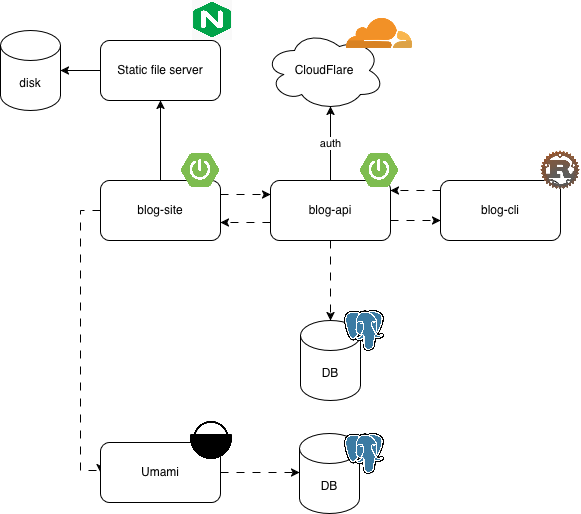
These are the basic components:
- **blog-site**: The actual site you are visiting right now
- **blog-api**: A REST API that the site interacts with to fetch posts and books, among others.
- **blog-cli**: A CLI tool that I use to manage posts and books
- **umami**: The self-hosted analytics solution I use. More on this below.
- **DB**: I have two Postgres databases running on my server: one for the blog and one for the analytics service
- **Static file server**: This is, as its name implies, a static file server that I use to serve assets for these posts, such as the image above. It's a simple NGINX server for now.
Everything runs in Docker containers and is orchestrated via [docker compose](https://docs.docker.com/compose/). This is a simple solution that works _fine_. The only downside, for now, is that I have to update the images manually every time I make a change. This is one reason I try to have as much as possible in the database. And I say "try" because most of the time I am too lazy to update the DB schema and make it a problem for future me to update the Docker image in the server instead.
Another important component is CloudFlare. The way my services are exposed over the internet is through a [CloudFlare Tunnel](https://developers.cloudflare.com/cloudflare-one/networks/connectors/cloudflare-tunnel/). This is a fantastic and easy to configure solution. Basically, you have the tunnel program installed in your server and it exposes your services via some configuration. It really couldn't be easier.
CloudFlare also takes care of securing my services. There are [applications](https://developers.cloudflare.com/cloudflare-one/access-controls/applications/http-apps/) and [policies](https://developers.cloudflare.com/cloudflare-one/access-controls/policies/) which you can configure to authenticate requests. For example, my blog's API is behind a [service auth](https://developers.cloudflare.com/cloudflare-one/access-controls/service-credentials/service-tokens/) policy that only allows other services with valid credentials to access it. For web applications, you can configure stuff like OneTime PINs, GitHub login; etc.
The only downside to this configuration is that I depend on CF. So, they go down, I go down. But honestly, I trust them more than I trust myself. It's more likely for my Raspberry to go down than for CloudFlare to have an outage (speaking from experience here).
## How I publish and update posts
I write my posts in [Obsidian](https://obsidian.md/). Then, I use the CLI tool I talked about earlier to upload them to the server and store them in the database. The CLI tools takes care of parsing and escaping the posts, among other things (or at least it will, for now I've only written the book handling commands hehe).
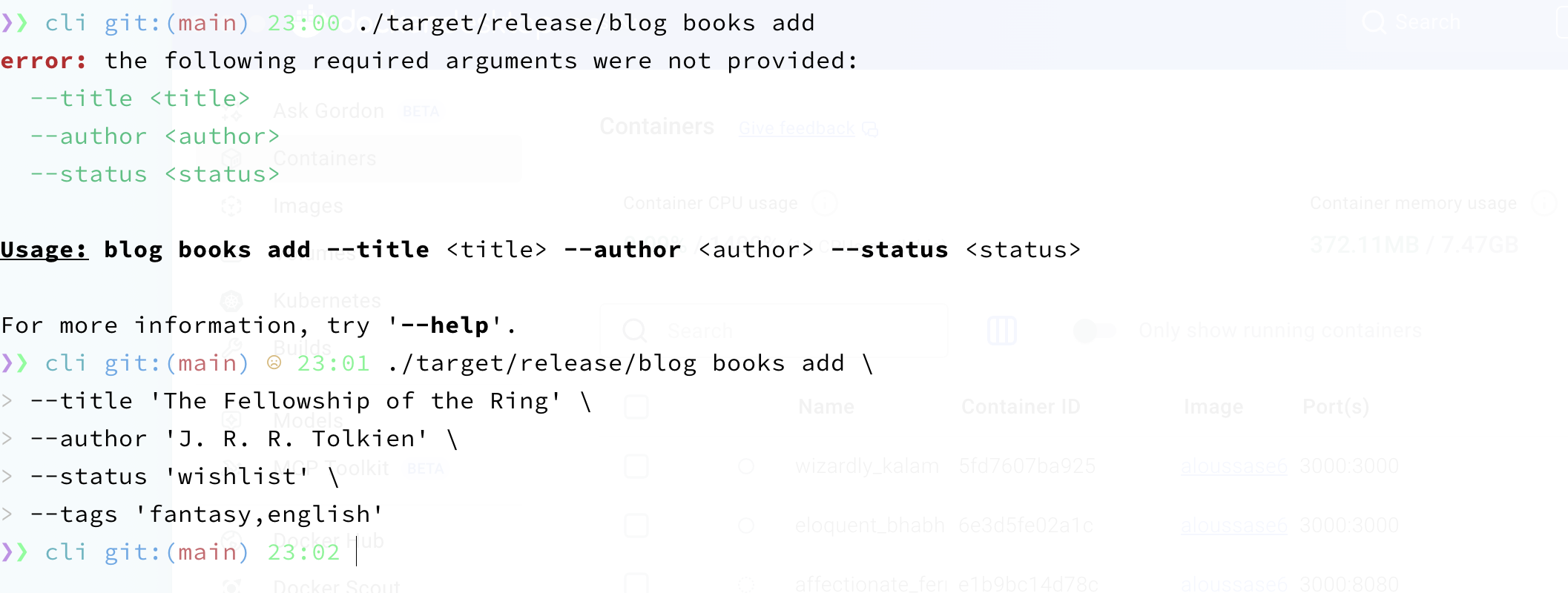
I wrote the tool in [Rust](https://rust-lang.org/) for no specific reason. I just wanted something that would compile to an executable and had a good command line parsing library. I don't particularly like Rust, so I might rewrite it in the future, perhaps in something like [Zig](https://ziglang.org/).
The only noteworthy thing here is that requests to the blog API are, of course, secured behind CloudFlare's access policies. This means the CLI tool must authenticate providing the necessary credentials. This makes the choice of using a CLI instead of a web dashboard more appealing, since in the CLI I can just load the credentials from the environment or a configuration file. If I made a publicly accessible web dashboard for this I would need to secure it via something like JWTs or [OAuth2](https://oauth.net/2/).
## Analytics
I manage analytics using an open source tool called [umami](https://github.com/umami-software/umami) . I am self-hosting it on the same server as the rest of my apps. Configuration is dead simple, you just have to add a script tag to your site with your website ID and you're good to go. Here's what the dashboard for my blog looks like:
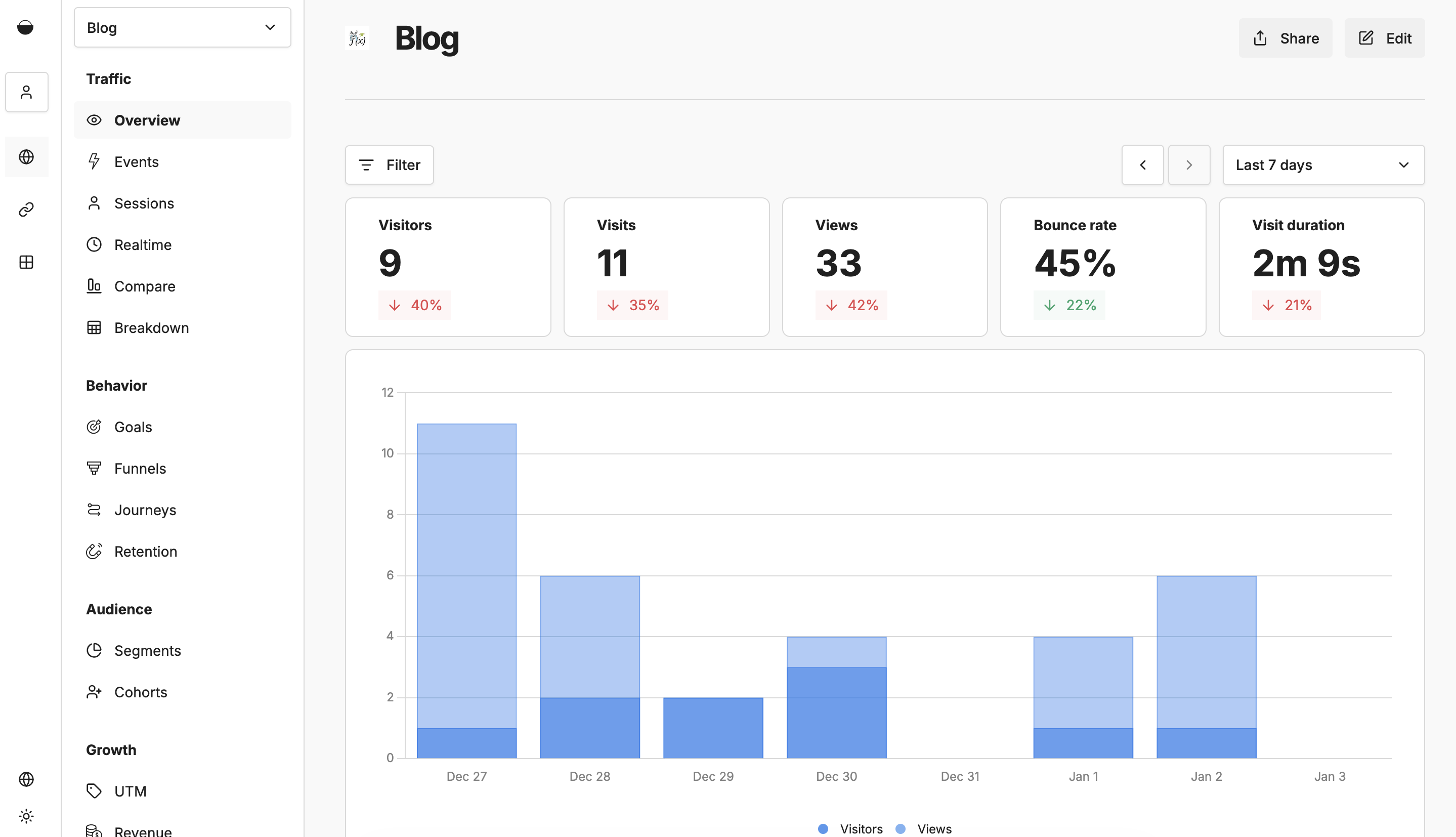
As you can see, I get stats such as bounce rate, visits and their duration. I can also see where in the world this visits come from and what specific paths in the site they are visiting.
It's a great tool, easy to configure and enough for my needs (which are none actually, I'm just a "sapo"). 💯 would recommend.
## Plans for the future
### Observability
I have an issue opened in my repositories to instrument my deployments with an OTEL (OpenTelemetry) agent. The goal is to have a server dedicated to observability tools (e.g. Grafana) where I can send signals and build a couple dashboards.
### Deployments
I also would like to switch to using Kubernetes for deployments. That's what we use at work and I've already read a book on it, so I know the benefits I am going for. Namely, easier and more resilient deployments. I think I am too lazy to do that, but who knows. Perhaps one rainy afternoon I'll do it.
### Media management
The way I manage assets right now is I have a static file server running on Docker and manually scp images to the volume mounted on the server. This is fine, but could be better. My idea is to have a service to which I'd post images. The service would then compress them, perhaps tag them or whatnot, and copy them to the static file server's volume. I'm planning on developing this service in [Elixir](https://elixir-lang.org/).
### Security
I like CloudFlare well enough. Nonetheless, sometimes its services might fall short in terms of securing my applications. For example, as far as I know, CF does not offer any OAuth2 solution that let's me configure callback URLs and such.
For this reason, I want to have a [Keycloak](https://www.keycloak.org/) instance hosted on a separate Raspberry as well. The idea would be to use this instance for all auth needs that I might have (for example, for exposing a web application securely).
## Closing comment
So this is it, my blog naked before your thirsty eyes. I hope you found some value here and are motivated to create your own blog as well. I'd love to see how others are managing theirs, what tech they're using and such. I think having a hand-crafted blog where you spill your thoughts and share them with others is a very personal and human way of interacting in a community. I would definitely love to see more of my fellow programmers (or not) do it.
Last updated 2026-01-04